Music Theory Exit Tickets for Middle School (That Take Two Minutes)
Five two-minute music theory exit tickets using Three Minute Theory chapter questions, Live Review, review assignments, and worksheets, plus how to turn the answers into tomorrow's warm-up.
The bell rings in two minutes. Your band just learned what the bottom number of a time signature means, and you have no idea who actually got it. A good exit ticket answers that question before students leave, so tomorrow's warm-up starts in the right place.
This post covers music theory exit tickets for middle school choir, band, and orchestra that take about two minutes. Each one uses a real Three Minute Theory tool you can open at the end of class: projected chapter questions, Live Review, review questions on student devices, and printable worksheets. Then it shows how to turn the answers into tomorrow's plan.
Exit Tickets, Bell Ringers, and Quizzes Do Different Jobs
All three are short, and all three ask theory questions. They answer different questions for the teacher.
- A bell ringer starts class. It wakes up yesterday's idea while students get their instruments out. Our music theory bell ringers post has prompts for that slot.
- An exit ticket ends class. It checks the one idea you taught today, so you can decide what happens tomorrow. It is usually ungraded or lightly graded.
- A quiz checks a unit. It covers several ideas and usually goes in the gradebook. Our post on music theory quizzes for band, choir, and orchestra covers that kind of check.
If you use one tool for all three jobs, students stop taking it seriously. Keep the exit ticket small and focused on today.
What Makes a Good Music Theory Exit Ticket
- One skill. Today's skill, not the whole unit.
- Three questions or fewer for the room. One recall question, one apply question, and one question tied to the music in their folder.
- Every student answers. A correct answer from the loudest student tells you nothing about the back row.
- It changes tomorrow. If the answers would not change your next warm-up, the exit ticket is too easy or too broad.
Exit Ticket 1: Three Projected Questions With a Timer
This is the fastest option when students do not have devices out. Open the Assessments page, choose the volume, and click Project Quiz on the chapter you taught today. Set the Question Timer before you start. The choices are Timer Off, 10, 15, 20, 30, 45, or 60 seconds, with 20 seconds as the default.
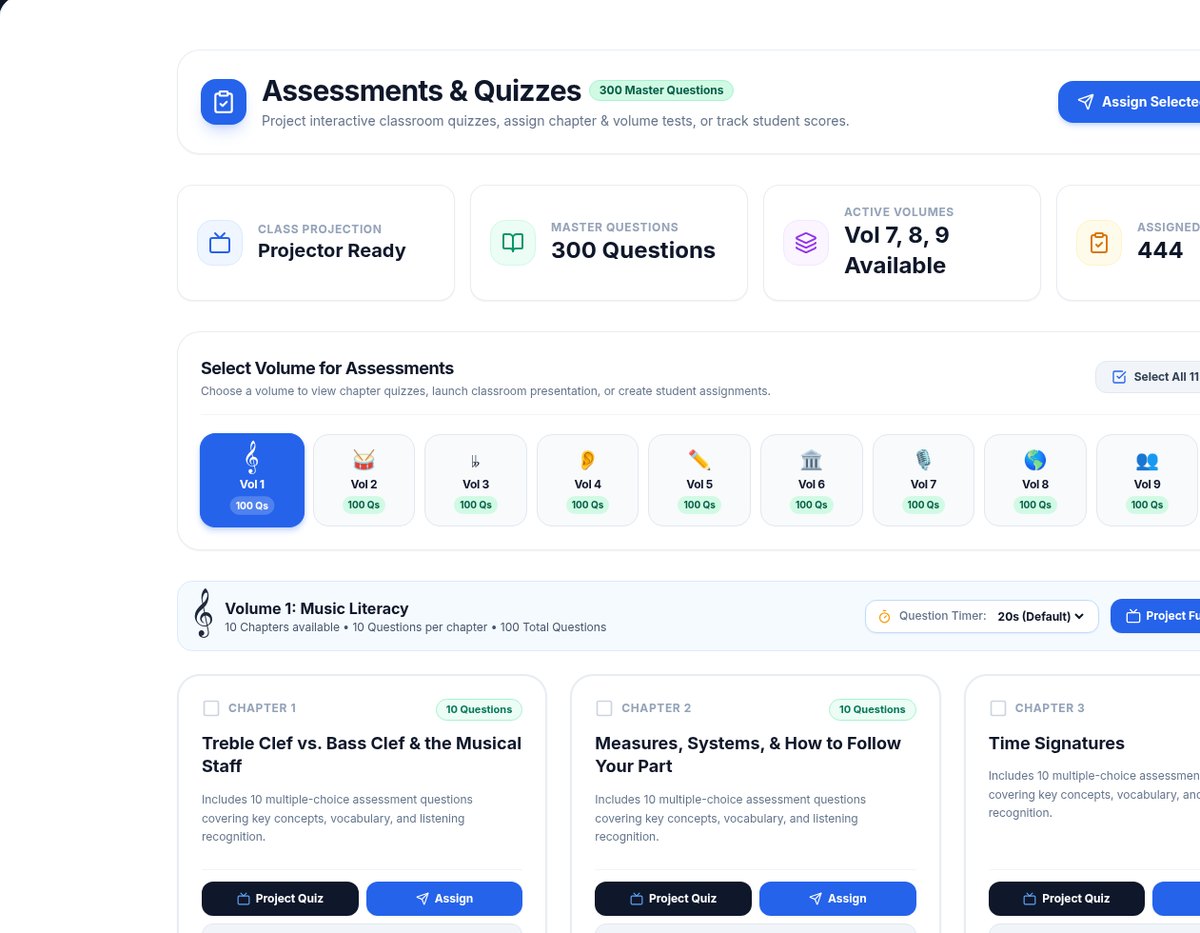
The Assessments page. Click Project Quiz on today's chapter and set the Question Timer to 10 or 15 seconds for an end-of-class check.
Each chapter has 10 questions. For a two-minute exit ticket, run the first three with a 15-second timer, then close the presentation. Have every student hold up one to four fingers close to their chest before the timer runs out and the answer appears. Write down which question split the room. That is your next warm-up.
Exit Ticket 2: Live Review When the Lesson Ends Class
If the lesson is the last thing you do, Live Review turns it into the exit ticket. The lesson plays on the room screen, and student phones become answer pads. Signed-in students tap Join from their dashboard, and a join code works for anyone else.
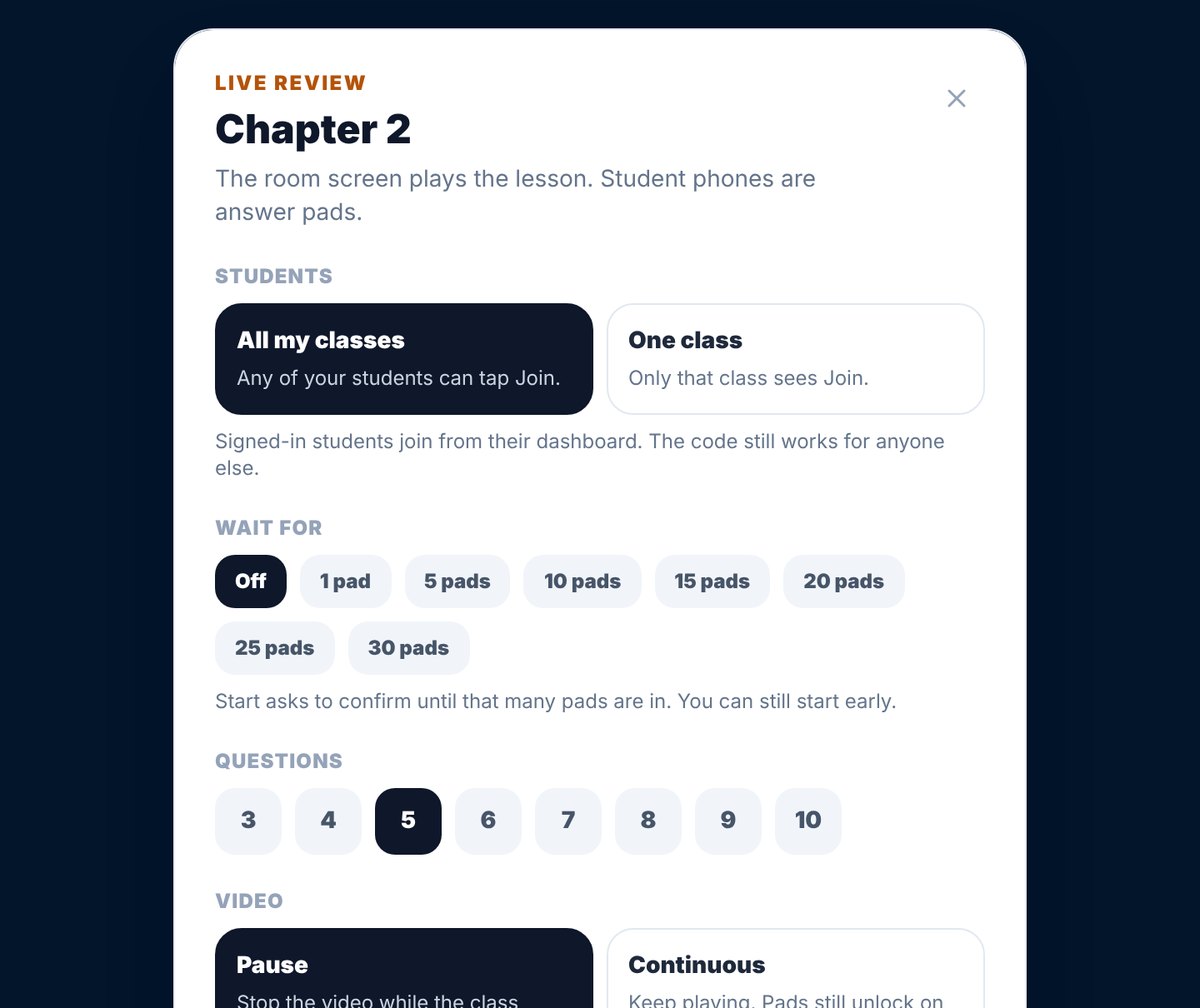
The Live Review setup. Choose 3 questions for an exit ticket and Pause, so the video stops while students answer.
Choose 3 questions, the lowest setting. When you reveal each answer, the screen shows how many students picked each choice, which tells you more than a percentage.
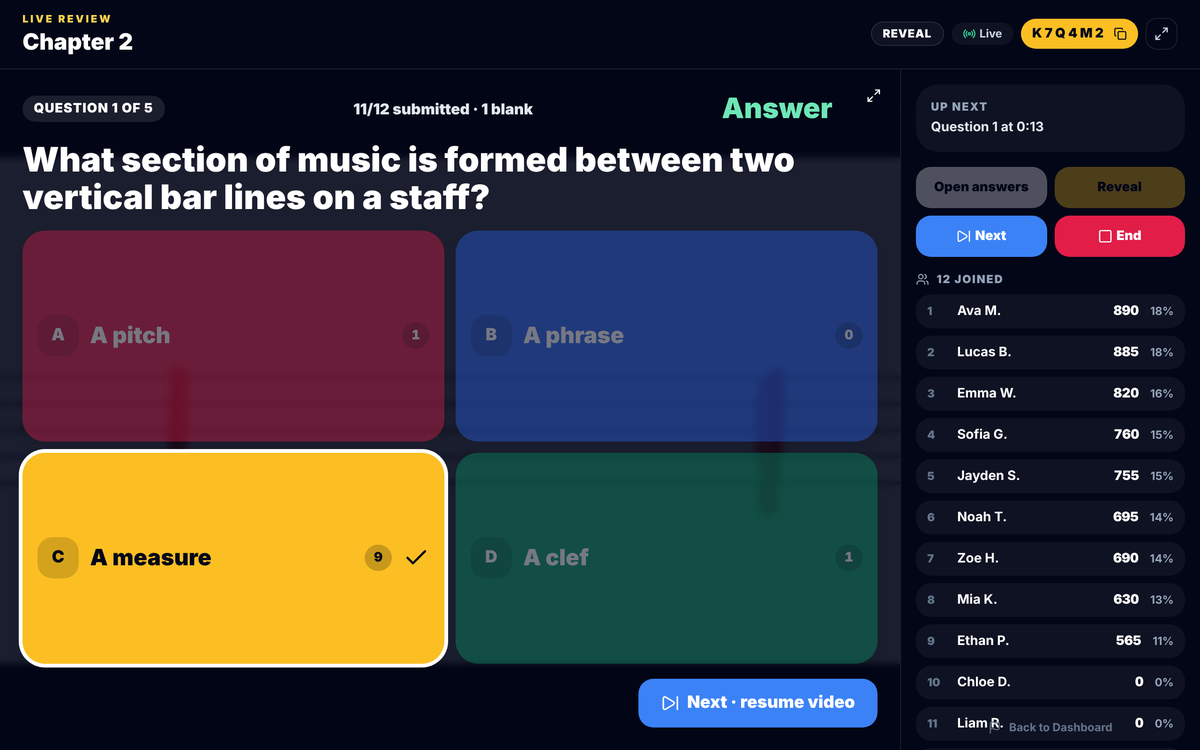
A Live Review reveal. Nine of the 11 students who answered chose A measure, and two did not. Before you move on, ask one student to explain why A phrase or A pitch is not the answer.
At the end, you can save the scores to the gradebook or leave them as a practice check.
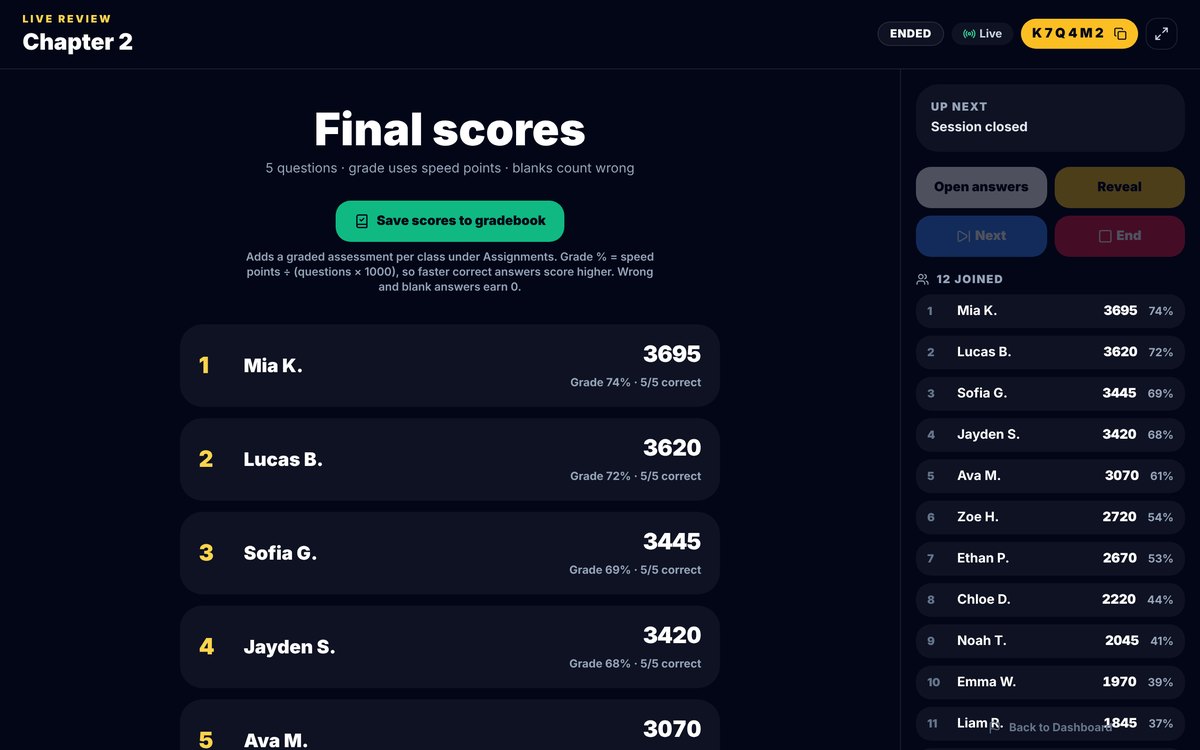
The Live Review final scores. For an exit ticket, look at who is near the bottom, not who won, and check in with those students tomorrow.
Exit Ticket 3: Review Questions on Student Devices
In a class with Chromebooks or tablets, students can answer on their own devices while you put instruments away. On the Create New Assignment screen, each chapter row has + Lesson Only, + Full, and + Questions Only buttons. + Questions Only adds just that chapter's 10 review questions, without the lesson.
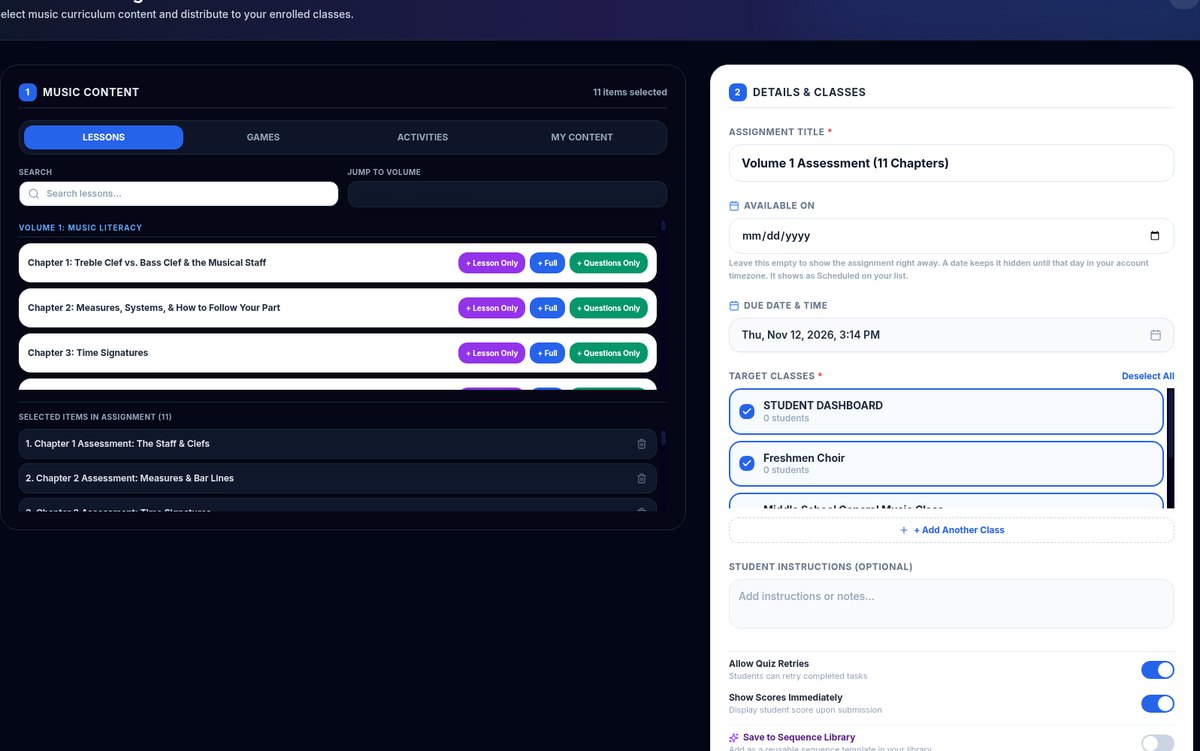
The Create New Assignment screen. Click + Questions Only on today's chapter, pick the class, and turn off Allow Quiz Retries so the exit ticket shows a first try.
Turn on Show Scores Immediately if you want students to see their score as they leave. Turn off Allow Quiz Retries for an exit ticket, so you see each student's first try. You can save the assignment to your Sequence Library and reuse it next year.
Exit Ticket 4: An Ear-Training Exit Ticket
Some skills should be checked by ear, not on paper. After a Volume 4 lesson such as Chapter 32, Steps vs. Jumps, play or sing two pitches and ask students to show a flat hand for a step or a jump with two fingers. Do three pairs, then one pair from your concert piece.
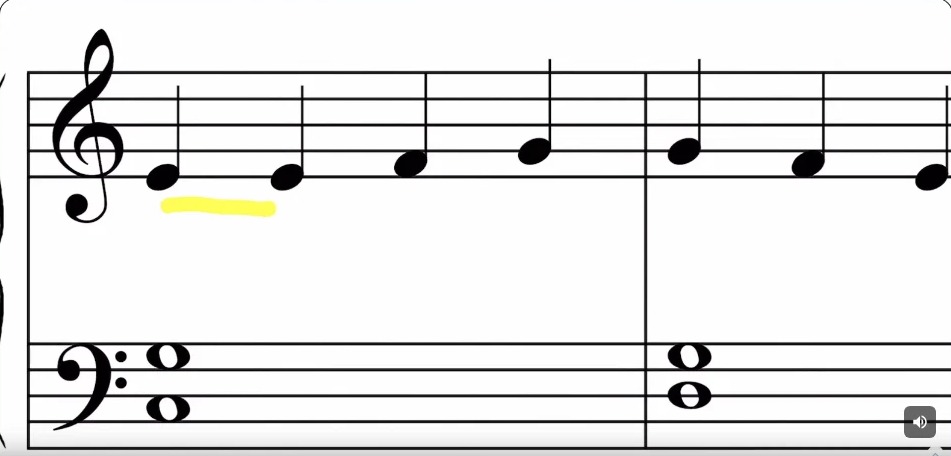
From Chapter 32, Steps vs. Jumps. Use the lesson's example, then play three pitch pairs as a quick ear-training exit ticket before students pack up.
Every Volume 4 chapter also has 10 assessment questions on the Assessments page. Project one or two of them to back up the listening check.
Exit Ticket 5: Paper, When Devices Are Not an Option
Every chapter has a printable worksheet. For an exit ticket, you do not need the whole page. Choose two or three questions from today's chapter, then have students write answers on a half sheet or the back of their music folder card.
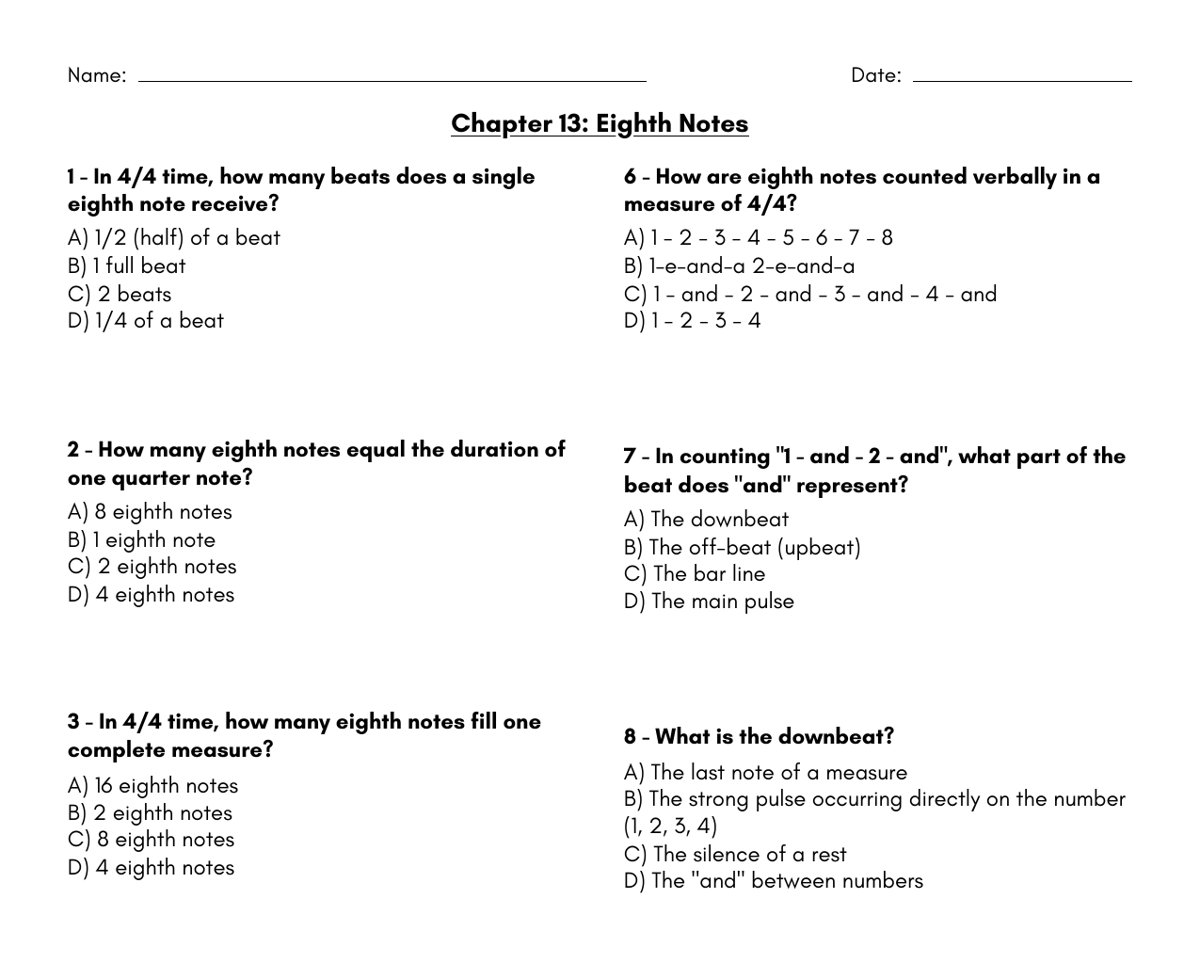
The Chapter 13 (Eighth Notes) worksheet. Choose two questions for a paper exit ticket, and save the rest for a sub day or homework.
Printable PDFs stay locked during the free trial, so use the projected or device options until you subscribe.
Turn the Answers Into Tomorrow's Warm-Up
An exit ticket is only useful if it changes tomorrow. Sort the answers into three groups:
- Most students got it. Move on, and spiral the idea back in a week.
- About half got it. Start tomorrow with one TMT Trivia question on the same chapter, then reteach from the explanation.
- Most students missed it. Replay the lesson tomorrow, then repeat the same exit ticket.
TMT Trivia is useful for the reteach because it explains each answer. Read the explanation aloud, then ask students to find the same idea in their folder music.
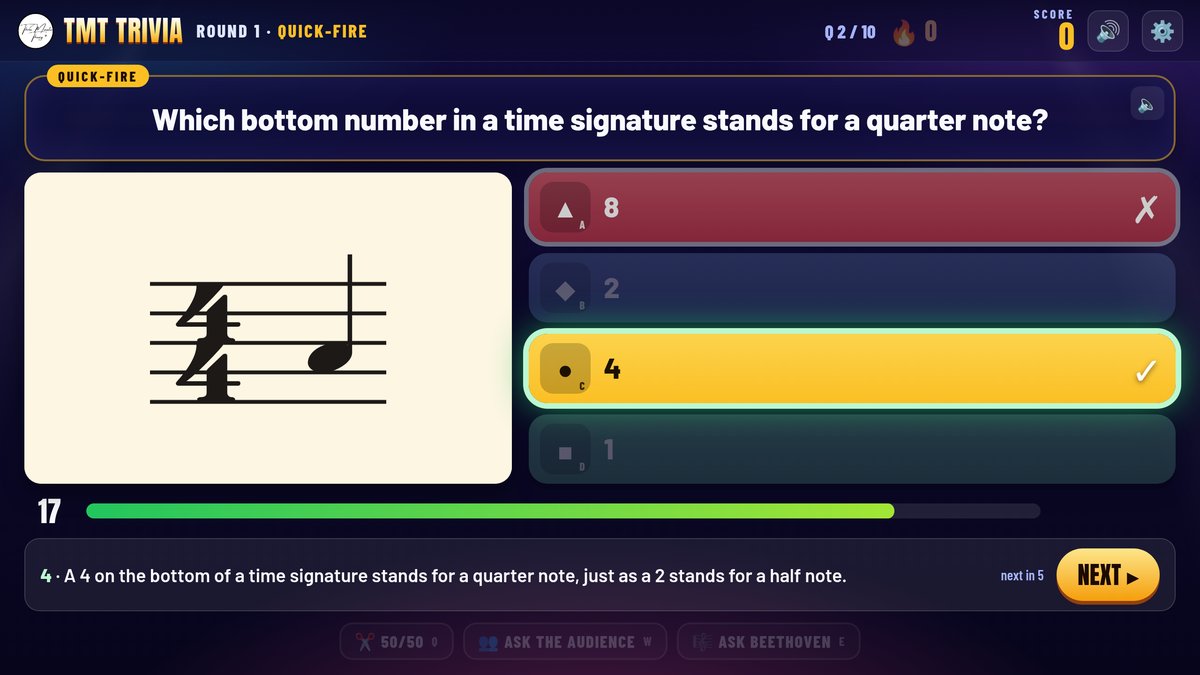
A TMT Trivia explanation on time signatures. If students missed the bottom-number question on yesterday's exit ticket, start with this one.
If you assign games for practice, the assignment page has a Question review. Every student gets the same questions in the same order, and you can sort by Most missed to see which question tripped up the class. You can also mix up to three chapters in one game, so a review on yesterday's exit ticket chapter and two older chapters is a single assignment.
A Week of Exit Tickets
Here is a sample week for a middle school band learning time signatures:
- Monday: Chapter 3 lesson. Exit ticket: three projected questions with a 15-second timer.
- Tuesday: Warm-up from Monday's most-missed question. Exit ticket: point to the time signature in your part and tell a neighbor what the top number means.
- Wednesday: Live Review with 3 questions on Chapter 3.
- Thursday: Rehearsal only. Exit ticket: two questions from the Chapter 3 worksheet.
- Friday: Questions Only assignment on Chapter 3 for anyone who missed two or more this week.
Frequently Asked Questions
What is a music theory exit ticket?
A music theory exit ticket is a short check at the end of class on the one idea you taught that day. Students answer two or three questions, and you use the answers to plan the next rehearsal.
How long should an exit ticket take in an ensemble class?
About two minutes. Choir, band, and orchestra classes need most of the period for rehearsal, so keep the exit ticket short enough that you never skip it.
Should I grade music theory exit tickets?
Usually not. Treat them as information for you. If you want a grade, use a separate quiz on the whole unit and keep exit tickets as practice.
What is the difference between an exit ticket and a bell ringer?
A bell ringer starts class and reviews something students learned before. An exit ticket ends class and checks what they learned today.
How do I give exit tickets without student devices?
Project three questions from the Assessments page and have students answer with fingers or small whiteboards, or use two questions from the chapter's printable worksheet.
Start Tomorrow
At the end of your next rehearsal, save two minutes. Project three questions on today's chapter, count the fingers, and write down the question that split the room. That question is tomorrow's warm-up.
If you want the chapter questions, Live Review, and worksheets ready to go, see Three Minute Theory for choir, band, and orchestra, or try Three Minute Theory free for 7 days at ThreeMinuteTheory.com.